
Why Your AI Influencers Look Like Plastic Dolls
AI-generated models can look technically flawless, yet something feels off. They have a waxy perfection: the skin is too smooth, the hair sits like a helmet and symmetrical faces hold a beautiful but vacant stare. What if more realism came not from adding detail, but from learning to speak the language the image model itself understands?
By EpicflarePublished Updated 5 min read
Part 1: The Devil Is in the Details (and Imperfections)
For more realism, the goal is to counter the model's default tendency toward an idealized reality. This starts by being specific about the very things that make us human.
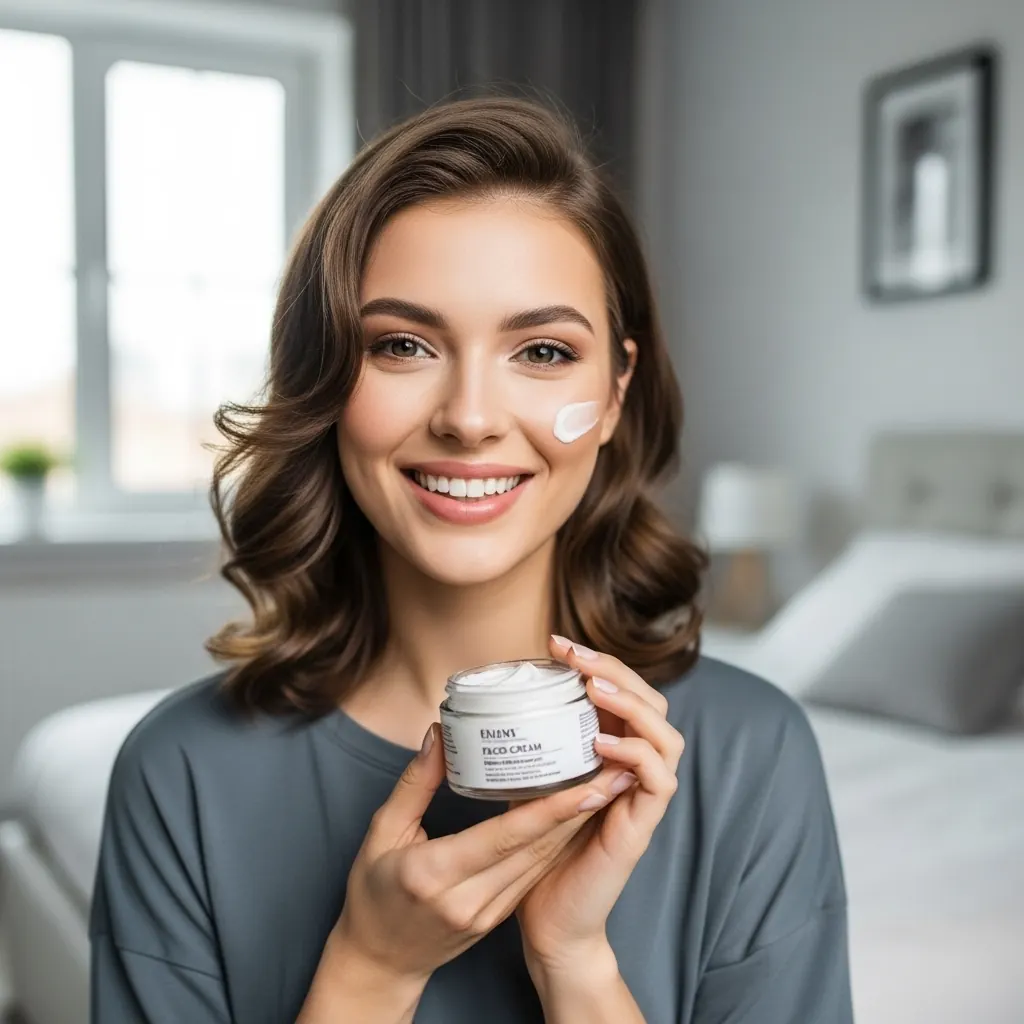
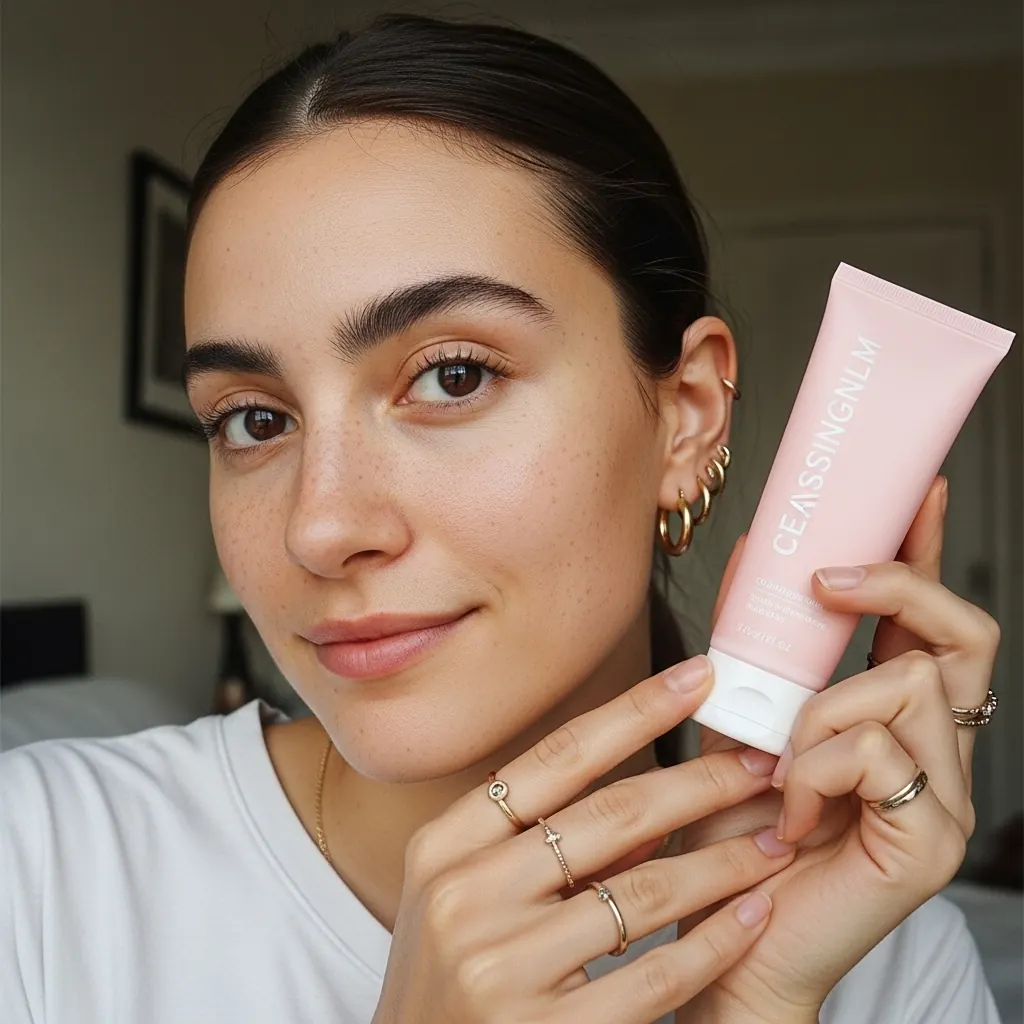
Skin, Pores and Other Physical Features
Instead of a generic “realistic skin”, describe the texture and character of a living person's skin in the prompt.
- Be explicit about texture: Use prompts like
Natural skin texture with visible facial pores, specifying the prominence of pores. Add details likea light dusting of noticeable freckles across the nose and cheeks,a healthy, moisturized sheen and specular highlights, or evensubtle, realistic skin folds around the midsection for authenticity. This pushes the model beyond a flat, flawless surface. - Embrace asymmetry: Perfect facial symmetry is a common giveaway of AI-generated faces. Explicitly ask for
natural asymmetry in facial features. No human face is perfectly symmetrical, and this small detail can make a noticeable difference. - Ask for authentic expressions: A static, frozen smile looks lifeless. Prompt for genuine emotion that affects the entire face. For instance,
a joyous, wide smile with eyes crinkling at the cornersis more believable than just a “smile”. It connects the expression to a physical, muscular reaction. - And everything else: The same approach applies to every other physical detail, from hair to nails, including wrinkles, eyebrows, teeth and nose.
Using Negative Prompts as Guardrails
While you tell the AI what to create, it is just as useful to tell it what to avoid. Where the model supports them, negative prompts help guard against the uncanny valley. Think of them as a list of rules that keep the model from defaulting to its “perfect” state.
Your negative prompt can list what to avoid:
- No perfect skin:
(unrealistic skin texture, plastic skin, porcelain skin, wax skin, airbrushed, smooth, glossy, retouched, photoshop, flawless) - No doll-like features:
(plastic, waxy, doll-like, mannequin-like),(vacant stare, empty eyes, lifeless eyes, dead eyes, glassy eyes, rendered eyes) - No fake expressions:
(frozen face, static expression, stiff expression, forced smile, insincere expression) - No wig-like hair:
(helmet hair, wig-like, stiff, solid, perfectly coiffed, symmetrical hairstyle) - No perfect faces:
(perfectly symmetrical face, flawless, beautiful)
By rejecting these digital artifacts, you steer the AI toward a more grounded and authentic result.
Part 2: Speak the Language of Photography
Stop telling the AI to create a “photorealistic image” and start telling it how the photo was taken. In our experience, this is the most useful shift you can make in your prompting.
Many AI image models are trained on very large collections of images from the internet, often paired with captions and descriptions that mention the camera, lens, film and style. As a result, a model can associate a specific lens or film stock with a particular look. Generic terms like “hyperrealistic” tend to be less effective, because many images labeled that way are CGI renders or heavily retouched photos.
To get closer to realism, anchor your prompt in the real-world practice of photography.


Reference Specific Cameras, Lenses and Film
This draws on the associations the model has learned. Instead of asking for a “blurry background”, specify the lens that creates it.
- Lenses for depth and character:
DSLR, 85mm lens, f/1.8: points the model toward the background compression and shallow depth of field of a classic portrait lens.Leica Summicron-M 35mm f2 ASPH: evokes the sharp, candid feel of a high-end street photography lens.
- Film stocks for texture and color:
Kodak Portra 800 film, slightly shaky, unfiltered: does not just ask for a retro look; it points the model toward the color rendering, grain and warmth associated with this well-known film stock. “Slightly shaky, unfiltered” adds a layer of human error.Cinestill 800T: can add a “halation” effect, a subtle red glow around highlights that is characteristic of this film stock. It is an imperfection you would not get by asking for “perfection”.Polaroid camera, natural light: evokes the soft, slightly washed-out colors and the familiar feel of an instant photo.
Embrace Unprofessional Authenticity
Sometimes, the most realistic shot is the one that does not look professional at all. Guide the AI toward a user-generated content (UGC) or social media aesthetic.
Example prompt
Extremely unremarkable iPhone shot, framing—just a careless snapshot, uneven light. Angle is amateur, the composition nonexistent, the overall, Effect is aggressively mediocreThis prompt explicitly tells the AI to avoid professional composition and lighting, which tends to produce an image that feels captured by a real person in a real moment.
By shifting your instructions from what you want to see (“a realistic woman”) to how it was captured (“a candid shot on Kodak Portra 800 film with a 35mm lens”), you give the AI specific, technical anchors that refer to real-world photographic examples. This is often the difference between a pretty digital painting and a photo that feels real.
So, the next time you set out to create a realistic model, remember: start with imperfection, steer the AI away from perfection and, above all, tell it what camera to use.

Go further
Agentic AI and media buying: An investment guide
A framework for assessing architecture, interoperability, operating costs and control when investing in AI for media buying.
PDF · 27 pages · Free · one short form unlocks every resource
Related reading
- AI for Ad Operations: From Request to Controlled Execution
Explore an AdOps workflow for deal requests, with explicit business rules, human approval and practical criteria for evaluating AI support.
- Bringing AdTech Expertise into AI Workflows
Turn platform knowledge, business rules and operational playbooks into AI workflow requirements, then test how reliably they are applied.
- AI Agents or Automated Workflows? Choosing the Right Approach
Compare AI agents and automated workflows through task requirements, control, evaluation and operating cost to choose a suitable starting point.
- Building an AI Workflow: Start Small, Evaluate, Expand
Scope an AI workflow around one operational task, define evaluation criteria and add complexity only when testing shows it is needed.